

Calling
Advanced call logs and insights
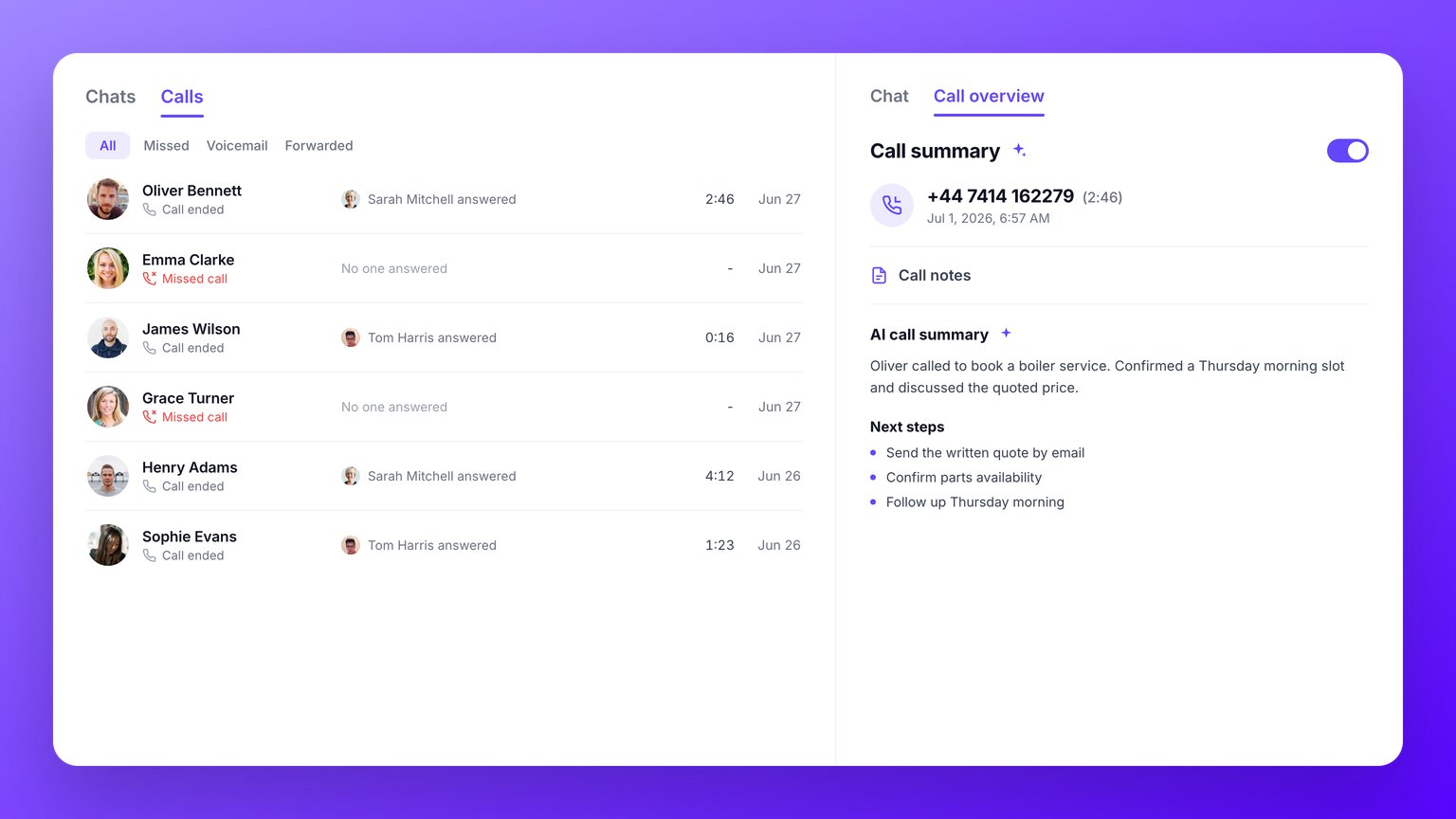
- Every call in one place. Incoming, outgoing and missed calls, with missed ones marked in red.
- The detail that matters. Who the call was with, which way it went, how long it lasted, and who on your team handled it.
- Call insights. Spot the patterns across your calls, so you can see trends rather than reading them one by one.
- Filter and dig in. Narrow down to just missed, incoming or outgoing calls.
- Jump straight in. Click any call to open the full conversation and see the recording, voicemail or texts around it.
AI
AI call summaries
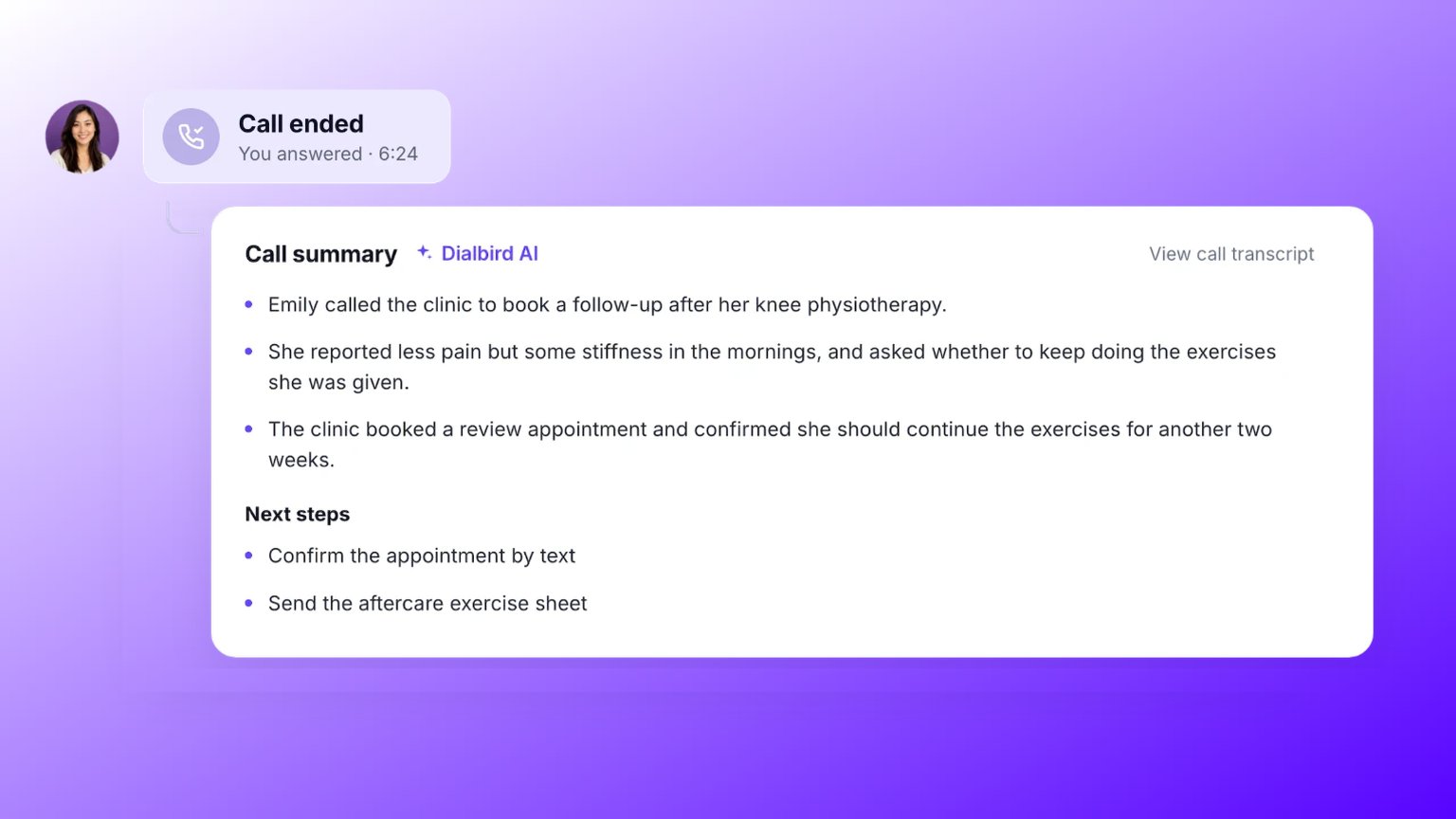
- The gist in seconds. A short, clear summary of what the call was about.
- Next steps, captured. The actions to follow up on, so nothing slips through.
- Turn it on or off. Switch the summary and the transcript on or off whenever you like.
- Genuinely accurate. Powered by the latest AI alongside our own, so you can trust what it gives you.
AI
Call transcripts
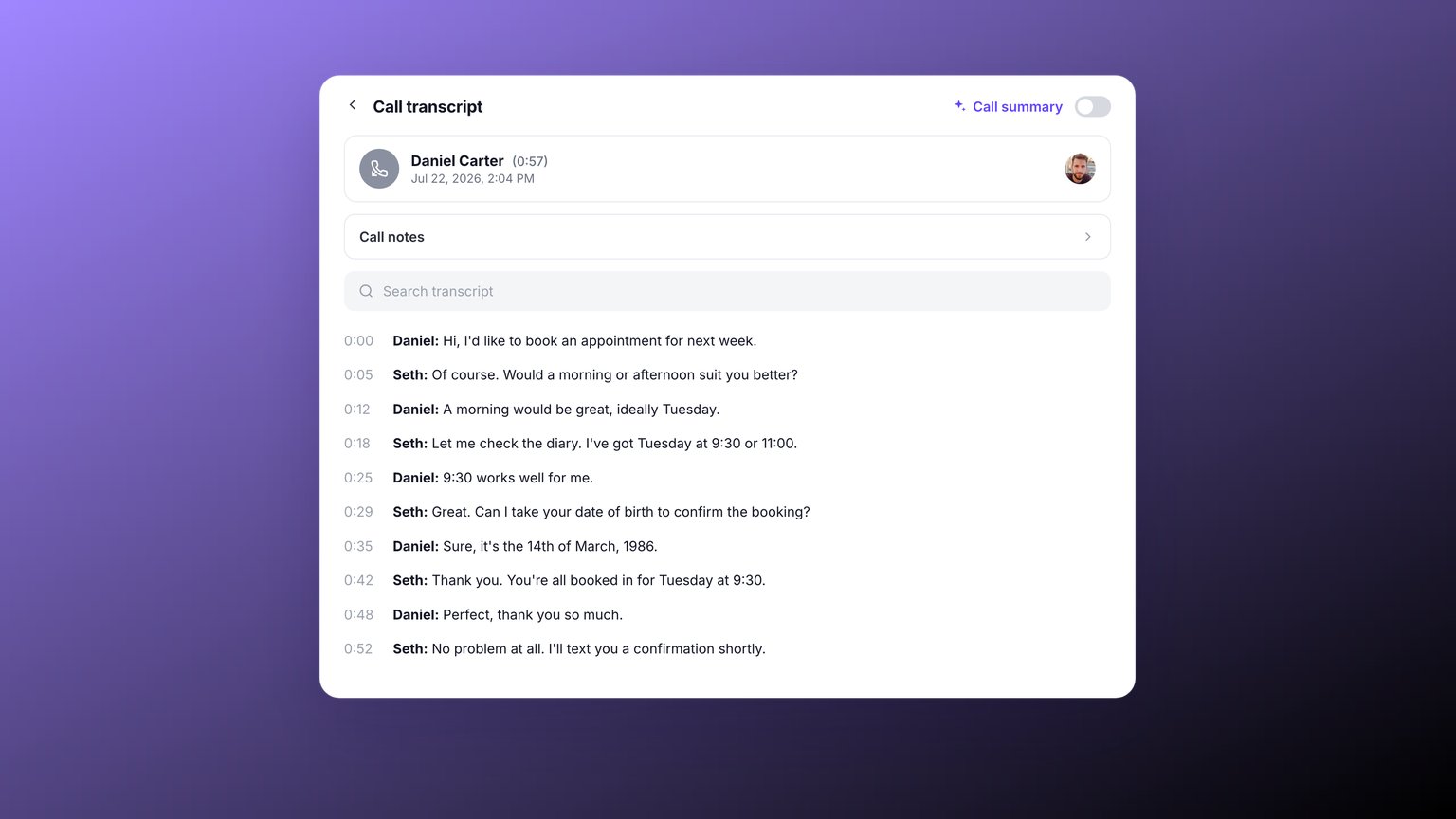
- Your calls in text. A full written record you can skim in seconds.
- Find the detail. Get back the address, the price or the promise without replaying the audio.
- On your terms. Turn transcripts on or off whenever you like.
Messaging
Scheduled messages
Line up a text to go out later, so a reminder or a follow-up sends itself at the right moment.- Write now, send later. Pick the time and Dialbird takes care of it.
- Great for follow-ups. Appointment reminders, check-ins, and thank-yous.
Analytics
Analytics and reporting
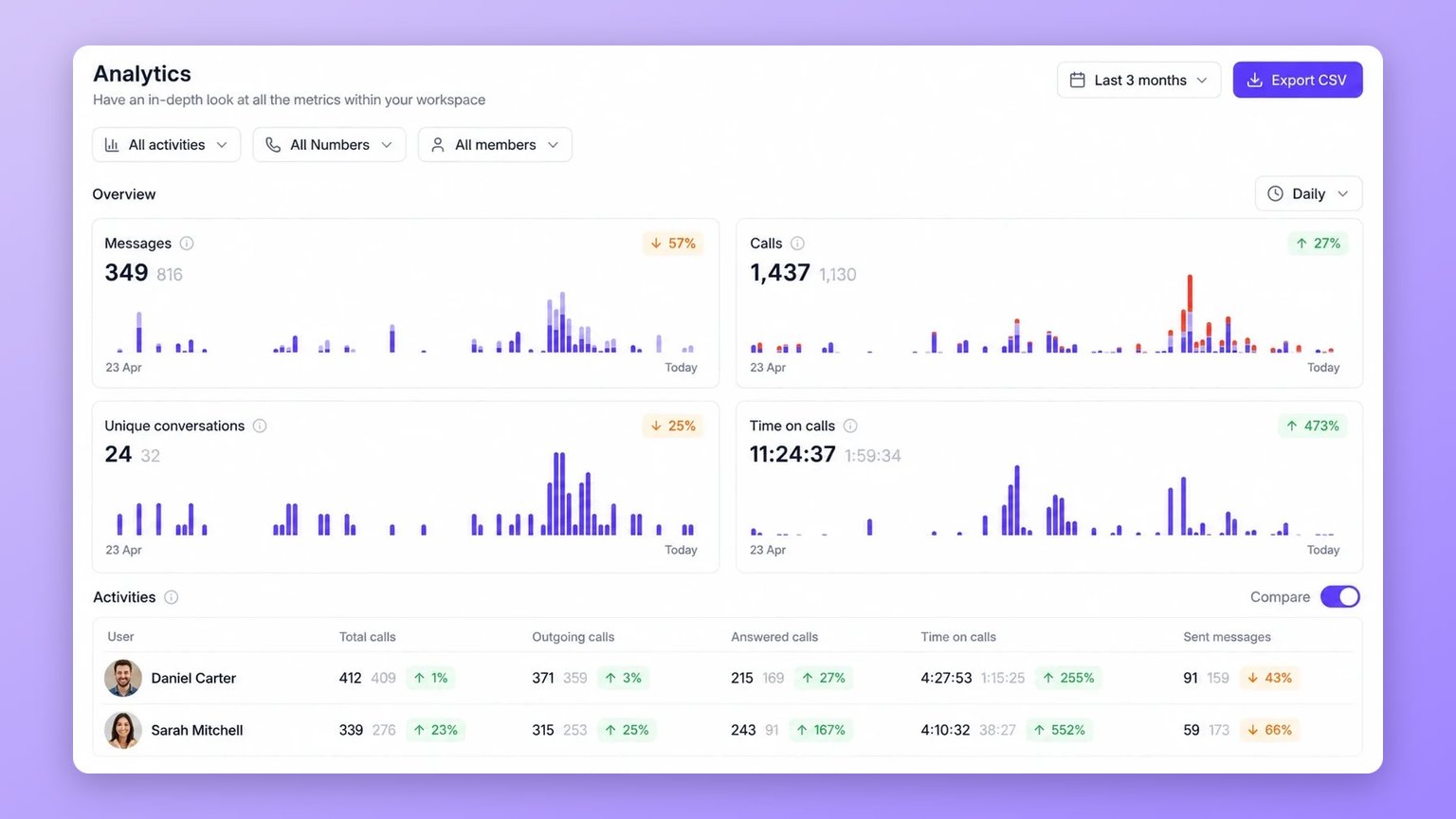
- The numbers that matter. Track messages sent and received, calls made, taken and missed, unique conversations, and time spent on calls.
- Slice it your way. Filter by number, teammate and date range, from today to the last twelve months.
- Spot the trends. See how each period compares with the one before.
- Take it with you. Export the lot to a spreadsheet.
Calling
Advanced call recording
Record your calls the way that suits you, and stay in control while you are on the line. Turn recording on for every call, or reach for it the moment you need it.- Record automatically. Switch on automatic recording so every call on a number is captured without you lifting a finger.
- Record on the spot. Start recording manually part way through a call whenever the conversation matters.
- Pause and carry on. Pause the recording to keep sensitive details off the tape, then resume when you are ready.
- Stop any time. End the recording without ending the call.
- Easy to find. Recordings sit with the conversation, ready to play back, download, or copy a link.
- Let callers know. Turn on an optional notification so people hear that recording has started.
Integrations
Integrations
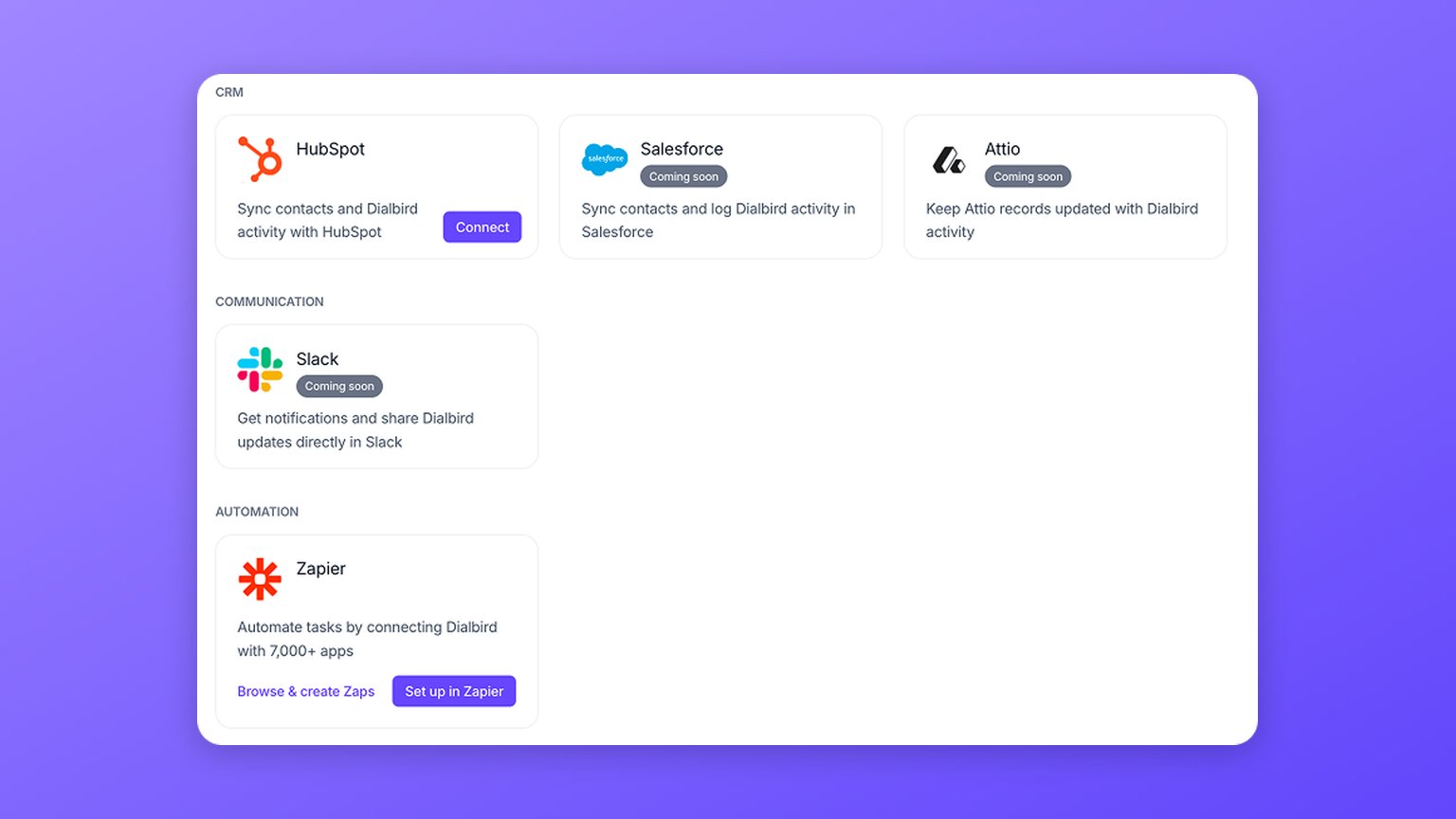
- HubSpot. Link your CRM and bring your contacts across.
- Zapier. Connect Dialbird to thousands of other apps and automate the busywork.
- Webhooks and API. Build your own integrations on top of Dialbird.
- More on the way. Further integrations are coming soon.
Calling
Hold and merge
Manage a live call with ease. Put a caller on hold while you sort something out, or merge a colleague in for a three-way call.- Hold and resume. Give yourself a moment without hanging up. The caller waits with hold music.
- Merge in a colleague. Turn a one-to-one into a three-way call.
Calling
Call transfer
Hand a live call to the right person, whether you need to pass it straight over or have a quick word first.- Cold or warm. Transfer straight over, or have a quiet word first before you connect them.
- Send it anywhere. To a teammate, an inbox that rings the whole team, or any phone number.
- Add context. Leave a note for whoever picks it up.
- Know how it went. Dialbird tells you whether the transfer completed, is pending, or failed.
Calling
Conference calling
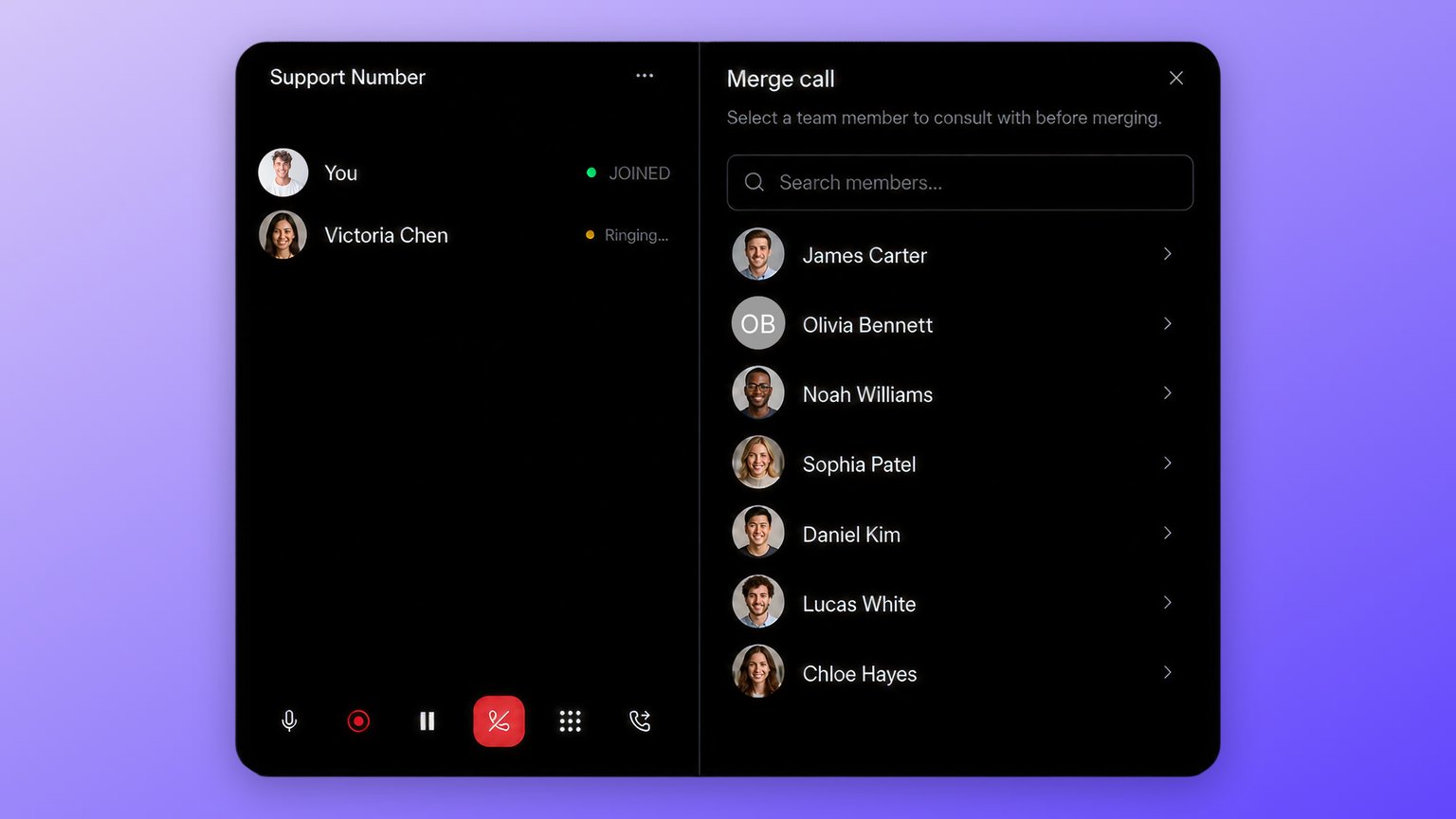
- Cold transfer. Hand a call straight over to a teammate, an inbox, or any number.
- Warm transfer. Have a quick word with a colleague before you connect the caller.
- Group calls. Merge everyone into a three-way call.
- Hold and hold music. Put a caller on hold, with hold music, while you sort something out.
Automation
Phone menus
Give callers a keypad menu, so “press 1 for sales, press 2 for support” is now yours to build.- Guide the caller. Play a message and let them choose where they want to go.
- Route each option. Send every keypress to the right person or team.
- Catch everyone. Decide what happens when a caller presses nothing, so nobody is left stranded.
Automation
Call flow builder
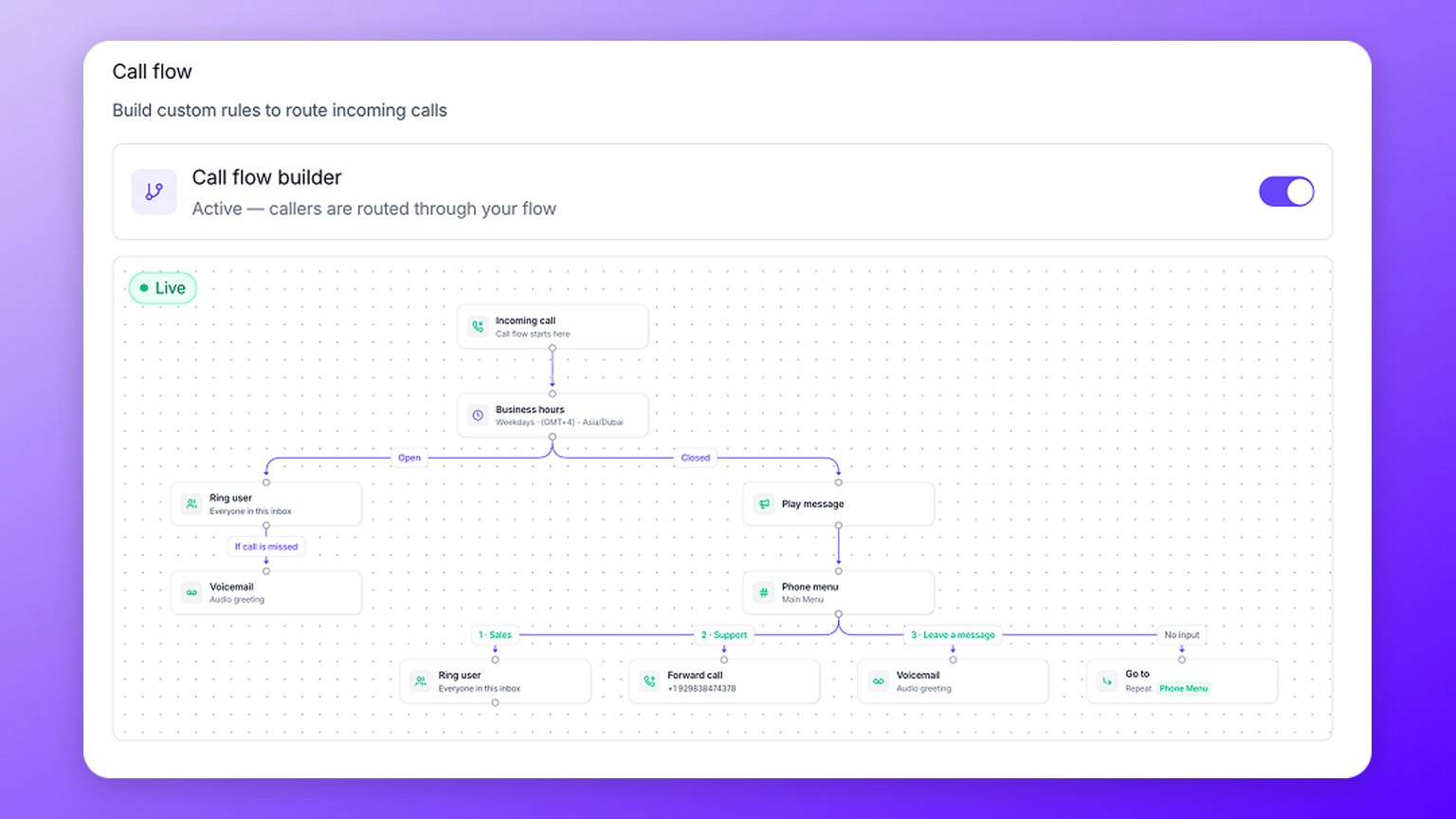
- Business hours. Branch on whether you are open or closed.
- Ring user. Ring one person, or everyone in an inbox.
- Phone menu. Let callers choose with the keypad.
- Voicemail. Take a message with an audio greeting.
- Play message. Play audio, then carry on.
- Forward call. Send the call to an external number.
- Rule. Continue only when a condition is met.
- Go to. Jump to another step in the flow.
Team
Team threads and tagging
Start a private thread on any customer conversation and tag the teammates who need to see it. The customer never sees it, so you can flag things and ask questions without a word reaching them.- Private to your team. Start a thread on any message, just for the people you work with.
- Tag a teammate. @mention a colleague and they get a notification.
- Tidy as you go. Mark a thread resolved once it is sorted.
Messaging
RCS messaging
Dialbird now supports RCS as well as SMS. RCS (Rich Communication Services) is the modern upgrade to the plain text message, and it makes a business text feel far more like a real conversation.Here is how RCS compares with an ordinary SMS:- Richer messages. Longer text and sharp, high-quality photos, instead of the squeezed-down images SMS sends.
- You know where you stand. Read receipts and typing indicators, just like a modern chat.
- Trusted and branded. Your business name shows on the message, so customers know it is really you.
Messaging
Automatic carrier registration
Texting US numbers means registering your business with the US phone carriers first, and it used to be a paperwork headache. Now it is built right into Dialbird.- All in one place. Complete your A2P 10DLC registration inside Dialbird, with no separate portals.
- Guided from start to finish. Answer a few questions about your business and campaign, and we handle the submission.
- Track your status. Watch it move through Profile, Brand and Campaign review, and fix and resubmit if anything comes back.
Automation
Business hours routing
Handle calls differently when you are open and when you are closed, so an after-hours caller hears the right thing instead of ringing out.- Set your hours. Choose opening times every day, on weekdays, or a custom schedule per day, in your own time zone.
- Route around them. Send out-of-hours calls to voicemail, a message, or wherever suits.
Automation
Auto-replies
Text people back automatically, so a caller you could not get to never just hears nothing.- After a missed call. Let them know you will call straight back.
- Out of hours. Reply when someone gets in touch after you have closed.
- Per number. Set a different message for each of your lines, up to 1,000 characters.
Team
Huddles
Quick audio calls with your team, right from a chat. No meeting links, no scheduling, just a fast way to talk something through.- Start in a tap. Kick off a huddle from any team chat.
- Pull people in. Add teammates while the huddle is going.
- Simple controls. Mute yourself, see who is on, and leave when you are done.
- Voice only. No video to fuss with.
Team
Team chat and groups
Talk to your own team right inside Dialbird, kept completely separate from your customer conversations so there is no risk of a private message going to the wrong place.- Message a colleague. Start a direct chat with anyone on your team.
- Set up a group. Get the whole crew in one thread.
- Find anything. Search across your team chats.
- Never mixed up. Team chat lives apart from your customer inboxes.
Messaging
Message reactions
React to a message without sending a whole reply, a quick way to say you have seen it.- One tap. Add an emoji to any message.
- Change your mind. Tap again to remove it.
- Less back and forth. Acknowledge something without another text.
Messaging
Snippets
Stop typing the same messages over and over. Save the replies you use a lot and drop them in with a couple of keystrokes.- Save your regulars. Your quote follow-up, your “on my way”, your payment details.
- Drop one in fast. Type a slash and pick the one you want.
- Edit any time. Change or delete a snippet whenever you like.
- Per number. Keep a different set for each of your lines.
Messaging
Picture messaging
Send more than words. Attach photos, PDFs and files to a text, perfect for sending a quote, a photo of the job, or a receipt.- Send what you need. Photos, videos, PDFs, and documents.
- More than one at a time. Attach several files to a single message.
- Share a contact. Send someone’s details across as a contact card.
- Right in the chat. Everything stays with the conversation.
Calling
Voicemail transcription
Read your voicemails instead of listening to them, handy when you are on a job and cannot put the phone to your ear.- Automatic. Every voicemail is turned into text for you.
- Skim in seconds. Get the gist without playing the message.
- Your choice. Turn it on or off for each number.
Calling
Voicemail
Never miss a message when you cannot pick up. Every number can take voicemail with its own greeting, and messages land right in the conversation so you never have to dial in to check.- Your greeting, your way. Record one, upload one, or type it out and let Dialbird read it aloud.
- Picks up when you need it. After a missed call, outside your hours, or wherever a call flow sends it.
- Set the wait. Choose how long a call rings before voicemail takes over, from 5 to 60 seconds.
- Read it too. Voicemails are transcribed, so you can read as well as listen.
Calling
Number blocking
Put a stop to a nuisance caller in one go. A blocked number cannot ring or text any of your lines, and it stays blocked until you say otherwise.- Blocks calls and texts. They cannot reach you either way.
- Covers your whole workspace. Nobody on your team hears from them either.
- Easy to undo. Unblock any number whenever you like.
Calling
Call logs and filters
A clear history of every call on a number, easy to sort through when you need to find one.- See it at a glance. Incoming, outgoing and missed calls, with missed ones marked in red.
- All the detail. Who it was with, how long it lasted, and who handled it.
- Filter it down. Show just missed calls, or only incoming or outgoing.
- Jump straight in. Click any call to open the full conversation.
Contacts
Shared contacts
You decide who on your team can see and message each contact, so the right people have what they need and the rest stays private.- Private or shared. Keep a contact to yourself, or share it with the whole workspace.
- Share with certain people. Pick specific teammates or inboxes instead of everyone.
- Set it and forget it. Choose a default so every new contact follows the same rule automatically.
Contacts
Contact lists
Group your customers into lists you can actually act on, like your regulars, everyone in one area, or the people waiting on a quote.- Build a list once. Add the customers you want, then reuse it whenever you need.
- Text everyone at once. Send a single message to a whole list with a broadcast, and each person gets it as a normal private text.
- Share with your team. Give colleagues access to the lists they need.
Contacts
Contacts
A proper address book for your business, built right in. Save the people you call and text, and Dialbird shows their name on every call and message instead of a bare number.- Everything in one card. Name, company, role, website, and more than one number or email.
- Add them on the spot. Save a new caller or texter straight from the conversation.
- Find anyone fast. Search by name, or filter by company, inbox or source.
- Keep useful notes. Jot down the gate code, the dog’s name, or anything else that helps next time.
Web app
Dialbird for web
Your whole business phone system now runs right in your browser. No handset on the desk, no software to install, and nothing tying you to one spot. Sign in from any computer and your numbers, contacts and conversations are right where you left them.- One place for everything. Make and take calls, send texts, and pick up voicemail without switching between apps.
- Built for a team. Share numbers so whoever is free can pick up, and see the same conversations your colleagues do.
- Always in sync. Works hand in hand with the iOS and Android apps, so start something on the web and finish it on your phone.
- Nothing to set up. Open your browser, sign in, and you are ready to go.